

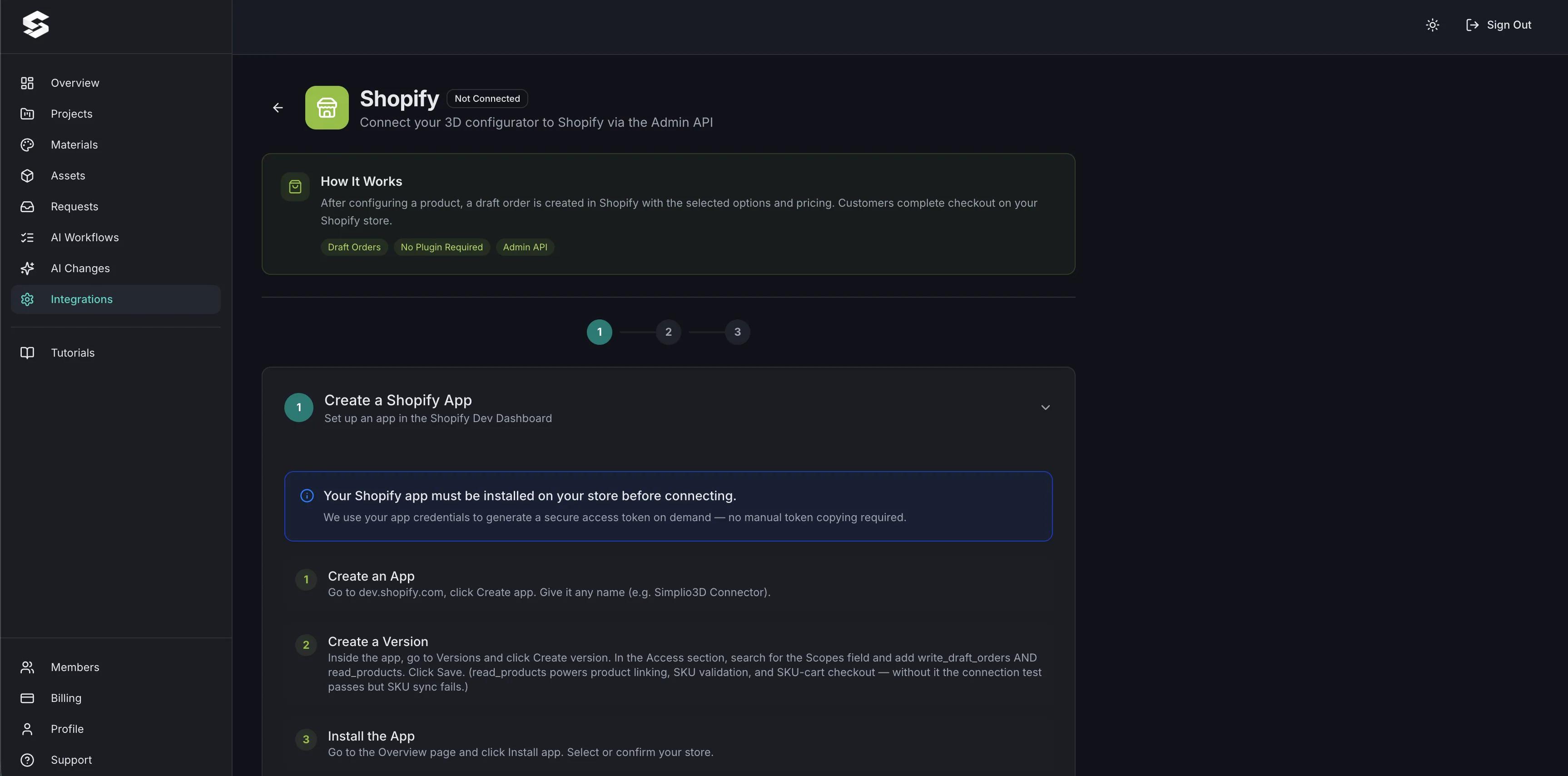
Install the app
The published Simplio3D app works on any store — the store owner installs it and approves the permissions.
3D Product Configurator for Shopify
Let shoppers configure a product in 3D on your Shopify storefront and check out with the configuration and the calculated price intact.
No credit card required

The published Simplio3D app works on any store — the store owner installs it and approves the permissions.
If you own the store and created the app in the same Shopify organisation, connect with a Client ID and Secret instead.
The integration needs write_draft_orders and read_products. It never asks for customer, order or payment permissions.
The simplest mode: a per-project product link that redirects the shopper to checkout.
Creates a pending order carrying a price override and a summary of the configuration.
On Enterprise, priced variants are matched to Shopify variants by SKU at checkout and sent to a multi-line cart.
See how users score Simplio3D across the major software review platforms.

4.6/5

4.3/5

9.5/10
The hard part of putting a configurator on Shopify is not the 3D — it is making sure the number the shopper saw is the number they pay. A configurator that opens in a lightbox and hands over a base SKU has not solved anything. Draft Order mode carries a price override and a configuration summary into the order, so the total your pricing rules produced is what reaches checkout.

If your configured products map onto real Shopify variants, SKU-matched cart mode resolves those SKUs live at checkout and builds a multi-line Shopify cart from them — so inventory, reporting and fulfilment keep working the way they already do. The editor validates as you author: SKUs are checked against the Admin API and shown with a badge for whether each one exists, is unique, or fails. It is an Enterprise feature and requires SKUs on your priced variants.
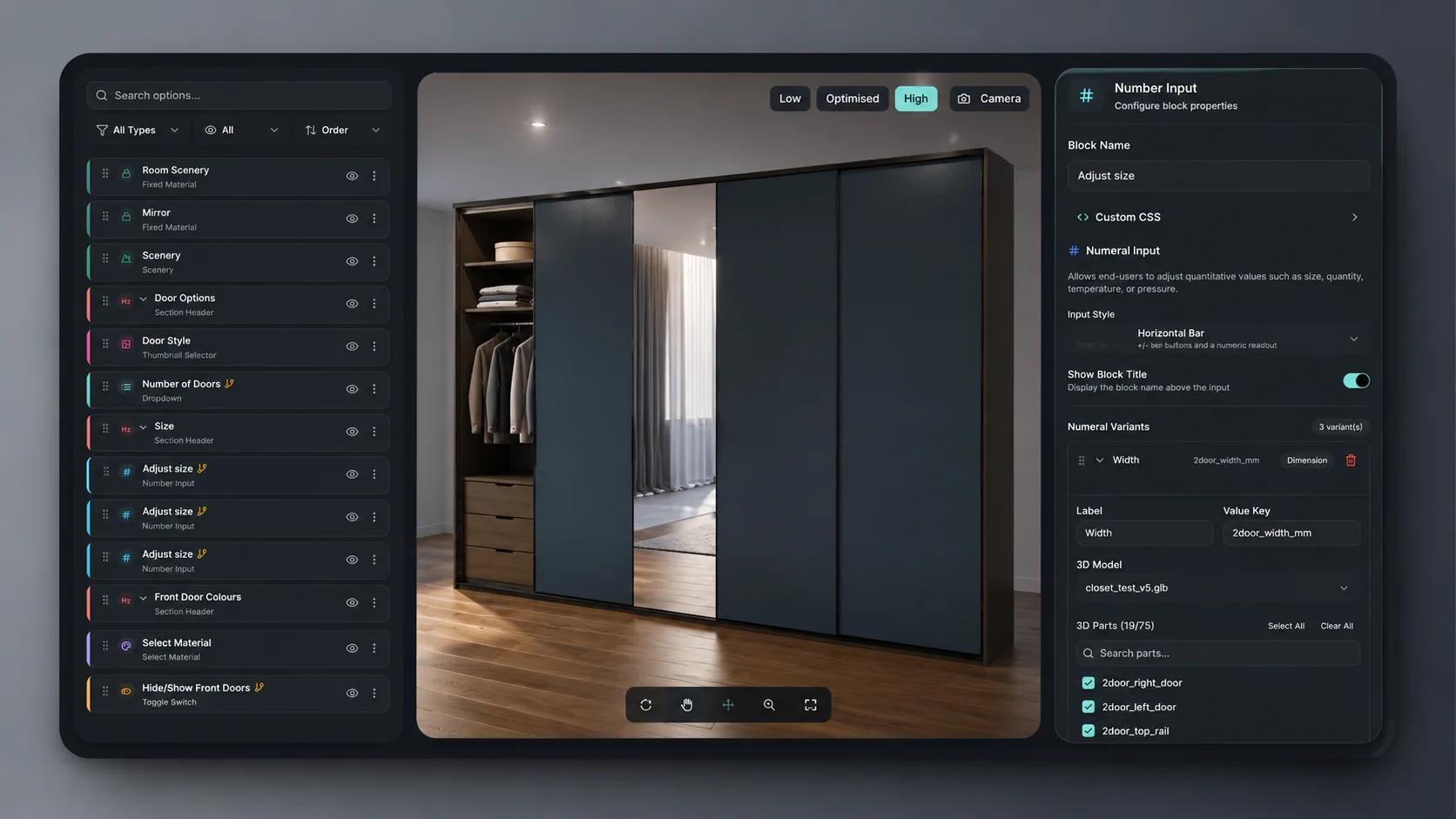
The configurator itself is built visually: upload a model, create PBR materials, add option blocks, set conditional logic so incompatible combinations cannot be chosen, and price it with tables or formulas. Simplio3D can also generate a starting configurator from a product description, and its AI assistant can audit an existing project. For large catalogues, the MCP server lets an assistant connect with a scoped token to check logic or calculate prices, proposing changes rather than applying them silently.
Connect the store, link the product, pick a checkout mode, embed.
Install the published Simplio3D app and approve the permissions, or connect a custom app with a Client ID and Secret if you own the store and the app in the same organisation.
Upload the 3D model, create materials, add the option blocks shoppers will use, and apply conditional logic so only valid combinations can be selected.
Use a base price, price groups, price tables and formulas so the total reflects the exact configuration rather than a starting SKU.
Cart link for a simple redirect, Draft Order to carry the configured price and summary, or SKU-matched cart on Enterprise for multi-line carts resolved by SKU.
Publish the project and place the iframe snippet on your Shopify product page. Restrict the domains allowed to embed it if you want it kept to your storefront.
The team at Simplio3D is very easy to work with, great problem solvers and very budget sensitive.

The execution of ideas on paper to a finished, functional application couldn't have been done any better.

Simplio3D have significantly enhanced our product presentations, providing a unique and interactive experience for our clients.

Versatile, easy to use and easy to deploy 3D Configurator. Super simple to use and create configurations on.

I have used other similar platforms and find Simplio3D the most intuitive way to build a configurator. I'm not a CAD engineer so I wanted a solution without features I couldn't understand.

It was so simple to get started, and the results have been very impressive. We now have it live on four different platforms.

Two: write_draft_orders, which creates Draft Orders with price overrides and configuration summaries, and read_products, which enables product linking, SKU validation and cart checkout. It never requests customer, order or payment permissions.
One Simplio3D account connects to one Shopify store at a time. Reconnecting to a second store re-points existing project links, so use a separate workspace per client store.
In Draft Order mode the order carries a price override and a summary of the configuration, so the price your rules calculated is the price charged.
An Enterprise mode that matches every priced variant in your project to a Shopify variant by SKU at checkout time, then redirects the shopper to a multi-line Shopify cart.
The editor validates them against the Shopify Admin API as you author, showing a badge for whether each SKU exists, is unique, or fails validation.
No. Connecting the store, building the configurator and embedding it are all done through the app and the editor.
The WooCommerce integration offers redirect-to-checkout and an add-to-basket plugin that keeps shoppers on your store.
Own a 3D product configurator to drive sales and generate proposals directly from your website


